Monday, September 19, 2016

Buster Posey, the Dodgers Rotation, and Enums

Earlier we went over the major data types, the Strings, Ints, Floats, Doubles, and Bools of the Swift programming world. These data types can cover a lot of ground and handle a lot of different situations, but they can be like fitted caps inherited from older siblings: Nice to have, but they don't quite fit as well as one that is your actual size.


That's where enumerations, classes, and structures come in. They are data types that you can customize in Swift. We'll start off with enumerations, aka, enums.

What is an enum?
An enumeration - or enum - is akin to its meaning:


Now let's talk a closer look at what this meanings in terms of Swift coding.

In a previous post, we talked about switch statements and how we used switch statements if we thought that there were multiple different outcomes to a function. The example we used was of Grady Little going out to visit Pedro Martinez in 2003 and how Little could stick with Pedro, pull Pedro for a righty, pull Pedro for a lefty, or pull Pedro for a knuckleballer. We also included a default which is required for switch statements: "Call up Bobby Valentine for an emergency mustache and shots at Stan's."

Unlike switch statements, enums do not require defaults.

Why are enums important?
At first glance, especially with other options such as switch statements, classes, and structures, it isn't exactly clear what makes enums so important. For the best explanation, I'm going to hand it over to a Quora response from Brent Royal-Gordon who puts it like this:


When do we use enums?
If switch statements are particularly good at handling potentially open-ended circumstances or cases thanks to its default option, then enums are particularly good at handling well-defined cases.

Let's take a look at how Buster Posey hits against the 2016 Dodgers Rotation of Clayton Kershaw, Kenta Maeda, Rich Hill, Julio Urias, and Ross Stripling.


Here we've created a DodgersRotation enum using the enum keyword first and then capitalizing the name of the enum. After opening up some curly brackets we set out our different Dodger starting pitching cases from Kershaw through Stripling. Then we close up our enum with the second half of the closed curly brackets on line 11.

Let's start with how Posey does against Kershaw. On line 13 we create a variable, busterVersusDodgersRotation and define it not as a String or Int, but as a DodgersRotation data type. To focus on Kershaw, we choose the Kershaw case of the DodgersRotation enum (ie, DodgersRotation.Kershaw). Because we've selected the Kershaw case, line 19 prints out on the right. Hitters have a career .566 OPS against Kershaw so Buster is slightly above average.

But what if you don't want to keep updating Posey's OPS in the case print out statement? Can't we just set whatever Buster's OPS is to the proper pitcher's case and then use string interpolation to print it out in the print statement? Yes, we can. Check it out.


So we set Buster's OPS values against each Dodger starter up top in the enum case by case. Once we do that and setup string interpolation in the switch statement, the OPS figures print out on the right (line 20). So far, Maeda's done a nice job against Buster.

Enums and Raw Values
Enums can also store raw values. According to Swift documentation, "enumeration cases can come pre-populated with default values (called raw values), which are all of the same type." That's nice, but what does it mean? Let's take a look:


Let's say we wanted to assign numbers to the Dodgers starters, starting with their #1, Clayton Kershaw. First, we declared that the DodgersRotation enum would be an Int. Then we assigned a value to the first case, in this case 1 to Kershaw. Then, in line 13 we called the rawValue of Kenta Maeda and in line 14 we got 2. But we never explicitly assigned 2 to Maeda. How did it do that? That's the power of raw values in enums.

We can also use raw values with Strings.


By declaring the DodgersRotation enum to be a String on line 5, the computer knows that each case will also be a String so when we call the Urias rawValue on line 14 it knows to print out the value "Urias" when we call for it through string interpolation. It automatically assigns the name of the case to be a String of the same name. case Urias = "Urias".

Now, if we want case Kershaw to be "Clayton", we will have to write, case Kershaw = "Clayton". At that point, the computer won't know what to assign the rest of the Maeda, Hill, Urias, and Stripling cases unless it is personally on a first name basis with the rest of the Dodgers' rotation.

Enums and Methods
What else can we do with enums? We can run methods on the enum types we create. Let's use methods to find out Buster Posey's OPS differential against two different Dodger pitchers, Clayton Kershaw and Ross Stripling.


Let's walk through this. First, we created the Posey enum which gives us the Posey data type that we'll run our method on on line 32. Next we'll create two different cases, the Kershaw case and the Stripling case as we'll put up Buster's numbers against each. Then we'll create a function, opsDifferential,  that subtracts Buster's career OPS (.849) from whichever pitcher case he's facing, Kershaw or Stripling. Because OPS uses decimals, we'll use Doubles to handle whatever OPS versus either Kershaw or Stripling that Buster has and for whatever the outcome of the equation will be.

On line 22 we declare a switch on a self. What is self? Self is not an easy concept as it gets rather abstract rather quickly. In this case, self refers to the Posey enum. So can we write "switch Posey" and get away with it as if they are synonymous? Good question.  Let's try. Here's what happens:


Basically, Xcode can take "switch Posey", but then it wants us to pass an argument in those parentheses (line 22). Unfortunately, we have nothing to pass and even if we left the parentheses empty Xcode will throw errors noting that it has no accessible initializers. In other words, Xcode wants a lot more from us than we need to give it to do what we need to do. Ergo, writing "switch self" is preferable as it references the Posey enum without having to worrying about all the other stuff.

Back to line 23! What do we want our function to do? We want it to figure out the difference between Buster's career OPS and his OPS against a specific pitcher, in these cases either Kershaw or Stripling.

Outside and below the differential function, we then create a new variable, the vsKershaw variable on line 32. To the vsKershaw variable we run the Kershaw method on the Posey enum data type. Posey.Kershaw has a lot of shorthand built into it so let's unpack it for a minute. Posey.Kershaw is a quick ways of saying, "Run the Kershaw method, that is, subtract Buster's career OPS of 0.849 from his OPS against Kershaw."

But wait! You say. We haven't told the computer what Buster's OPS against Kershaw is yet! You're right. Let's do that on line 33 where we'll create a variable, opsVsKershaw, and assign Buster's current career OPS against Kershaw (0.529) to opsVsKershaw.

So what do we have? We have a Kershaw method on a Posey enum set to the vsKershaw variable and we have Buster's career OPS versus Kershaw set to the opsVsKershaw variable. Now what?

So we have all the parts, now we need to put them together to make the function go. That's what happens on line 35. Line 35 reads like this, "Run the Kershaw method (as opposed to the Stripling method) on the Posey enum through the opsDifferential function which subtracts Posey's career OPS from his OPS versus Kershaw." That's a bit of a mouthful, but hopefully it makes more sense to you than opsDifferential = vsKershaw.differential(opsVsKershaw).

On line 36 we tell the computer to print our results to the console using string interpolation which prints out, "Posey's OPS against Kershaw is -0.320 compared to his career OPS of .849."

As you can also see through this particular example, it is important to name things that make sense to not only you, but to other developers who may look at the code in the future. If you name things appropriately others should be able to read your code and make some sense of it.

That's a good start on enums. We'll do more in the next post.

Special thanks to Benedikt Terhechte who did a thorough job of explaining enums and raw values here

Challenge: Run through the examples above with a different hitter against different pitchers. Baseball-Reference.com is good at providing stats.

On Deck: Associated values and pattern matching in enums.


Thursday, September 8, 2016

Retired Numbers & The Set Collection Type

There's only one Willie Mays. There's only one Juan Marichal. There's only one Jackie Robinson. And because they were such good baseball players they got their numbers retired by the Giants, Dodgers, and major league baseball. They are unique.


And sometimes you just need one of something. When it comes to Swift collection types, if you want one of something, you want a set.

If arrays are ordered lists and if dictionaries are unordered lists with unique keys, what are sets? Good question. According to the Big Nerd Ranch Guide Swift Programming, a "set is an unordered collection of distinct instances."

What does that mean? That means that sets are like arrays in that sets have a single value. That means sets are like dictionaries in that they are both unordered lists. And like a dictionary whose keys must be unique, a set's values must be unique. In our post on dictionaries, we showed how multiple Rockies' outfielders could play left-field. In a set, though, one only Rockies outfielder can play left-field.

Why are sets important?
Sets are important when uniqueness is your highest priority because sets do the best job of sorting out unique items and keeping out duplicates.

When should I use sets?
So the big question is, when is a good time to use a set as opposed to an array or a dictionary? Another good question. Sets put a priority on uniqueness. In arrays, you can have multiple values that are the same (a team roster full of people named Javy). In dictionaries, you can also have multiple values that are the same (four left-fielders for the Rockies), but the keys must be unique (the names of the Rockies' left-fielders have to be different). With sets, uniqueness is paramount. It's kind of like retired numbers (yes, I know the Yankees have two 8s and two 42s, but play along). Let's look at the San Francisco Giants' retired numbers.


Alright, how'd we get here? First, created a variable, giantsRetiredNumbers. We then informed the computer that we would assign a Set of Integers (Set<Int>()) to giantsRetiredNumbers. Starting on line 6, we populated our set with integers that represent retired numbers from the San Francisco Giants. We've got Monte Irvin (20), Willie Mays (24), Juan Marichal (27), and Willie McCovey (44) among others.

What happens if the Giants hire a new clubhouse manager, a young kid who's never heard of McCovey, and tries to give old #44 to a September callup? Let's see:


We may have ordered #44 to be inserted into the giantsRetiredNumbers set a second time (line 16), but as we can see on the right side of line 16, there's still only one #44! Interesting that there is no error here, but maybe Xcode is getting chill about how it rejects stuff. One can hope.

What can I do with sets?
We can loop through sets like this:


For each retired number in the giantsRetiredNumbers set we printed each one which gives appears at the bottom of the playground console immediately above.

Sets also play nicely together. Remember Venn diagrams? NO?!? OK, here's one based on the old Simon & Garfunkle song.


Venn diagrams, like the one above, have two circles that represent distinct groups. In this case, the groups are "people who are breaking my heart" and "people who are shaking my confidence daily." The intersection of these two circles, that is, the one thing these two groups have in common, is Cecilia.

The union of these two circles is people who are breaking my heart AND people who are shaking my confidence daily.

Sets also have a method that checks whether or not there are duplicates between them. Let's walk through some examples of these.

First, let's check to see if Barry Bonds has his number retired with the Giants.


Just checking! No retired number for Bonds with the Giants. And that's how to check if there is a specific item in a set. First, we created a constant, barryBonds. Then we told the computer what set we wanted to check, the giantsRetiredNumber set. Then we ran the ".contains" method on the giantsRetiredNumbers set. We then had to pass an argument in the parentheses so the computer knew what value to check for, in this case, 25.

Let's say we wanted to create a super team of retired Giants and retired Pirates. What an outfield! Mays, Clemente, McCovey! (Stargell can play first). How would we do that? Let's take a look.


How'd we do that? First, we created our Pittsburgh Pirate super team, a set filled with the unique retired numbers of guys like Roberto Clemente, Willie Stargell, and Honus Wagner (line 17). Then we created a superTeam constant. To that superTeam constant, we told the computer to take the giantsRetiredNumbers set and to create a union with the piratesRetiredNumbers set.

Also notice that while the Giants had a 4, 11, 20, and a 42 like the Pirates, in the superTeam set there is only one 4, 11, 20, and one 42. Uniqueness: that's what sets do.

What if we want to see what retired numbers the Giants and Pirates have in common? How do we do that? Let's give it a go.


And the winners are 4, 11, 20, and 42 (line 19)! Let's walk through how we did that. First, we created a new constant, superTeamIntersect that we'll assign the numbers that the two teams have both retired. Then we picked one of the teams, in this case, piratesRetiredNumbers and asked the computer what numbers it and the giantsRetiredNumbers set have in common through the ".intersect" method.

Now what if you want to make sure that two sets do not have the same items in common? In this case, you are not looking for the exact items in common or not in common, just a "True, the two sets have nothing in common" or "False, the two sets do have something in common." Let's give it a shot.


False! And why is it false? Because as we learned in the intersect section above the two teams have both retired 4, 11, 20, and 42! So it is false that the two teams retired numbers are disjoint (in other words, it is true that they are not disjoint because they do in fact have four numbers in common).

Challenge:
Use sets to create a super team between the retired numbers of the Cubs and the Tigers. What is their union? Where do they intersect? Tweet me what you find (@randallmardus).

On Deck: Enums, Structures, and Classes!

Tuesday, September 6, 2016

The Rockies Outfield & the Dictionary Collection Type

Some things just go together: Adam Jones playing centerfield; Rickey Henderson leading off; The Philly Fanatic playing the fool. If there's one, there's the other.

And this is a good way to think about the second Swift collection type, the dictionary. As in a regular dictionary where you look up a word and you get its definition, in the dictionary collection type there are two parts: They are called the key and the value. The key is akin to the word in the dictionary you look and the value is akin to the definition of that word.  Together, the two are referred to key-value pairs.

In baseball, we find examples in players and the number they wear (Carlos Gonzalez: 5), players and the position they play (Adam Jones: centerfield), players and their place in the batting order (Gary Sanchez: third) to name just a few examples.


Why are dictionaries important?
They offer more advanced ways to store information. Rather than just storing one piece of info like arrays do, dictionaries store two pieces of information at a time.

When do we use dictionaries?
If you want to store all the members of a team, you want to use an array. If you want to store all the members of the team and the position they play, you want to use a dictionary. In other words, use a dictionary collection type if you need to store two pieces of information for each item rather than just one.

How are dictionaries different than arrays?
Arrays are arranged in an ordered list according to their index numbers. Because they are ordered, we can have multiple values of players named Martinez, Jackson, or Smith because they will be unique by index number. Because dictionaries are not ordered list, dictionary keys must be unique. Let's take a look at an example.


As we can see immediately above, we can put the Jackson family roster in one array, but we can't put the Jenkins family roster in one dictionary using the same keys, "Jenkins", each time. We get an error. Why? Because the computer can't differentiate between one Jenkins key and another. Rather, we have to do something like this:


Notice how the order of the keys on the right hand side is different from the order we entered them into the dictionary on the left (line 7)? Why is that? Because dictionaries are not ordered lists by index number, the order doesn't matter. All that matters are that the keys are unique.

Arrays and dictionaries are also different in the types of values they can hold. Arrays can only hold one data type at a time. If you start a String array, all they can hold are strings. But if you start a dictionary that has a String key, it can have an Integer value like this:


What can we do with dictionaries?
Good question. As with arrays, we can do a lot. Here are some examples, but there are many more that you can explore.

You can count the number of keys in a dictionary by using the count method.


You can find a value from a specific key. Let's ask the dictionary what position Carlos Gonzalez plays.


How did we do that? First, we created a new constant, gonzalezPosition (we could have created a variable). Then we called our dictionary, rockiesOutfielders, and told it what key we wanted a value for from the dictionary ["Gonzalez"]. And that's how we got the value, "RF", to the key "Gonzalez".

What if we want to modify a dictionary value? Let's say Gerardo Parra now plays right-field.


How'd we do that? First, we chose the dictionary we wanted to modify (rockiesOutfielders). Then we chose which key we wanted to change ("Parra") and then we created a new value for the key "Parra", in this case, his new position which is "RF". To make sure it worked we called the rockiesOutfielders variable. On the right hand side of line 9, we can see that Parra used to play "LF", but now plays "RF".

What if we want to add another outfielder to the Rockies outfield? Let's give it a shot. Say the Rockies are in a pinch and need to put backup catcher Tom Murphy in left-field.


Here we start with the dictionary, rockiesOutfielders, then we choose the new key we want to add to it ["Murphy"]. Then we create the value for the "Murphy" key: "LF". To make sure it added to the dictionary, we call the name of the variable, rockiesOutfielders, on line 8 and there's Murphy in left-field on line 8.

OK, the Rockies' manager has changed his mind about Murphy. Now we need to remove Murphy from the rockiesOutfielders dictionary.


This time we started with the dictionary's variable, rockiesOutfielders, then called the removeValueForKey method after the ".". The removeValueForKey method needs to know what key we are going to remove so we tell it by passing the "Murphy" argument in parentheses. When we go to the next line, Line 8, and call the rockiesOutfielders variable to check if Murphy is truly out of the outfield, we can see that he's either on the bench or behind the plate again and out of the outfield.

But see that nil on the right side of line 7? And notice how Murphy is completely gone from the dictionary? While the method may be called removeValueForKey, we didn't just remove the value, but both the key and the value. So, a bit of a misnomer of a method there to keep an eye on in the future.

At this point, I bet you're asking, "But can we loop through dictionaries?" Yes, we can. Check it out.


What did we do here? We split our key value pair (the player and his position) into two different string interpolations. On the bottom we can see all six keys from our rockiesOutfielders dictionary printed out as they complete the loop through the dictionary.

But what if you just want to loop through one part of the dictionary, not both? We can do that. Watch.


We did it thanks to another for loop. Let's walk through it. First, we used the "for" keyword to let the computer know we wanted to setup a for loop. Then we chose which part of the dictionary we wanted to loop through, in this case, the key. Next, we specified what dictionary we need to loop through (rockiesOutfielders) and called the .keys method to be even more specific about what part of the dictionary to loop through.

Now let's say we want to create a Rockies roster array. Well, we already have the outfielders in our dictionary. Can we just move them over to the array so we don't have to type everything all over again? We sure can. Here's how.


First, we set up a new constant that we will assign our new array to, in this case, rockiesRoster. Then we declared that rockiesRoster would be a Array. But what, exactly, will be in the array? Let's just include the keys from the rockiesOutfielders dictionary. And on the right side of line 7 we can see our new rockiesRoster array with just names, no positions.

Challenge: Recreate these exercises with your favorite teams and Tweet them to me (@randallmardus).

On Deck: The sets collection type.

Thursday, September 1, 2016

Baby Bombers & the Array Collection Type

In the next few posts we'll go over three different ways to organize information that you can then pull from when you need it. This post will run a little longer than usual so feel free to come back to it. First, we'll start with the array collection type.

What is an array and why is it important?
To quote from Apple's Swift documentation, "An array stores values of the same type in an ordered list. The same value can appear in an array multiple times at different positions." Translation: An array will store all strings, all integers, or all floats, but will not store a mix of strings, integers, or floats. What's an ordered list? That means that Swift assigns an order to the string, integer, or float values you have in your array. The first string in an array is 0, the second string is 1. What? That doesn't make sense? No problem. I'll post an example below in a minute. What else should you know about arrays? Arrays can have the same value more than once. If you make an array of a team's roster by surname and you have more than one Martinez, Smith, or Jackson, the array can handle it. How does the array tell them apart? Through the unique index numbers assigned to each Martinez, Smith, or Jackson. OK. That's a good start. Let's jump into an example. 


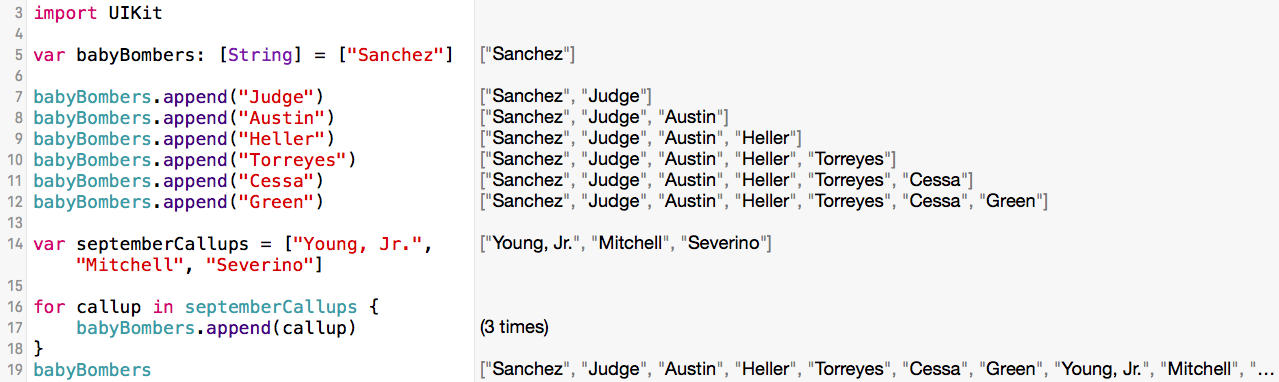
Say you wanted to create an array collection type to keep track of all the new Baby Bombers that the Yankees have called up this year. We'll start by creating an array, informing the computer that we will fill the array with strings, and then set that array to a variable called babyBombers.


See those [ ] brackets? Those brackets indicate that our babyBomber variable is going to be an array. Now let's fill or initialize that array with the name of a Baby Bomber.


There! We've added Gary Sanchez to the array. But what about Aaron Judge, Tyler Austin, Ben Heller, Ronald Torreyes, Luis Cessa, and Chad Green? Let's add them to the babyBomber array.


How'd we do that? We took three steps. First, we dropped a "." after the name of our array. This is like Sanchez putting his hand down to call a pitch. Want to see what other kinds of pitches you can call with that "."? After the last line above, type babyBombers. and take a gander at just some of your options:


What you see there is just a fraction of the functions you can call after that "." If you scroll down within that box you'll see many more. For now, we'll focus on the append function.

After the "." we typed append. And lastly, we told append exactly what to add to our babyBomber array by passing an argument. In our cases, the arguments are the names of the players. We pass arguments with ( ) parentheses immediately after the function keyword append.


You can see here, highlighted in blue, that Xcode shows us the append function and how if we do choose to append, that we'll need to include a new string element such as "Sanchez", "Judge", or the name of another Baby Bomber if we want to add it to our babyBomber array.

What if we want to remove Tyler Austin from the array? How would we do that? Let's give it a shot.


And Austin's gone! But how'd we do that? First, on line 14, we called the removeAtIndex function which, like the append function, takes an argument (). But wait, why can't we just pass "Austin" as the argument? Good question. Here's what that would look like:


In other words, we can't pass "Austin" as the argument to remove Austin because the removeAtIndex function only takes an integer or Int. But how do we know what Int Austin is? Another good question.

To answer that we need to think of the entire array as an index. In the back of some books you may find an index. That index is a complete list of all the topics addressed in the book.


While a book's index is arranged alphabetically, an array's index is arranged numerically starting with zero (0). In this case, "Sanchez" is 0, "Judge" is 1, and "Austin" is 2. So when we pass 2 as our removeAtIndex argument that's how we tell the array to remove Austin.

As you may have noticed when you typed "babyBomber. " into line 14 of your playground and saw all the different function options you had, there are a lot. I'll go over a few particularly popular ones here, but I highly recommend playing with the rest to find out what they do. I've found one of the best ways to learn is to just try things out to see what they do.

What if, say, you had the entire Yankee farm system in your array and you wanted to know how many players total you had. How would we do that? Well, we'd call the count function.


In this case, there are seven players in our babyBomber array. What if you want to add a little extra information to one of your Baby Bombers in the array? Say, you want to add "Jr." to Austin (he's not a junior, work with me).


How did we do that? First, we chose the array (babyBombers) then we chose where in the array we wanted to add something, in this case [2], and then, because our array is a variable full of strings, we told it exactly what we wanted to add. In this case, we want to add a comma immediately after Austin, then a space followed by Jr. And what about that +=? What's going on there? That's a little short hand. The long hand is, "babyBombers[2] = babyBombers[2] + ",  Jr." In other words, we are changing the value of babyBombers[2] by adding ", Jr." to "Austin".

What if we want to replace one of the names with another name and keep it in the same spot in the index? For example, let's replace Tyler Austin with Derek Jeter's unborn son, Jeter, Jr.


Like last time, we chose the array we wanted to edit, babyBombers, we chose which value in the array we want to edit [2], and then we assigned a new string value to that array, "Jeter, Jr."

What if we want to add an array of Yankee September call-ups to our babyBomber array? Let's take a look at that.


How'd we do that? First, we created a new array, septemberCallups, and filled it with strings such as, "Young, Jr.", "Mitchell", and "Severino". Then we set that array to the variable septemberCallups. Next we setup a for loop that goes through the septemberCallups array for each string value, or in our case, each of the three callups, and then appends it to the end of the babyBomber array which we can on the right of line 19.

We've appended new array items to the end of the array, but what if we want to insert a new item to the array in a specific place? Let's try that by inserting "Severino" after "Judge".


Before we complete this, take a look above at what Xcode offers us after we type ".insert". Xcode asks us for two things: to enter our new element which is a string ("Severino") and an integer to identify where in the array it should go. Now let's finish inserting Severino.


And there's Luis Severino on the right hand side of line 14 right after Aaron Judge and before Tyler Austin.

Now let's say you're working with a friend on a project and the goal of that project is to create a master array of everyone who has ever played for the Yankees. Your friend has amassed a big list that she's put into an array and so have you. Now you want to see if the two lists are the same. If they are, there's a chance you've got everyone. If not, you'll have to iron out who is missing whom. How do we check to see if the two arrays are equal? Let's take a look.


For the sake of time, we'll assume small lists of Yankees, one for Bob's list of Bombers and one for Jill's list of Bombers. A quick eye-test concludes that they both have all the same players, but Xcode tells us that the two arrays are not equal. Why?

Remember how arrays are ordered lists, in other words, that their orders matter? Well, Bob and Jill may have the same players, but they are listed in different orders so according to Xcode they are not equal. Bob and Jill will have to try another collection type to solve their problem.

Challenge: Re-write these examples with your team's rookies and Tweet them to me (@randallmardus).

On Deck: The dictionary collection type.

Friday, August 26, 2016

Successfully Rationalizing One's Way Out of a Suicide Squeeze & Force Unwrapping Optionals

My Babe Ruth League baseball coach was not afraid to call risky plays. He even made me pitch once which even I knew was a terrible idea, but, somehow, we escaped the inning unscathed.

There was one time, though, when I got the call for a suicide squeeze. He hoped it would go like this:


I figured it would end up like this:


Understand, I was not the Ruthian figure that I am now (...). I had a streaky bat which typically didn't get hot till the last three games of the season and this was not one of the last three games of the season. What I lacked in braun, I made up for in brains.

But you say, who needs braun to lay down a suicide squeeze? And you're right. But my team sucked, I sucked, and runs were few and far between. If I missed the bunt, if I fouled it off, or if I bunted it in the wrong direction, we're toast and the opportunity is lost.

So I did some quick math: First, this was junior high baseball: There was no shortage of errors, wild pitches, and passed balls to be had. While the pitcher threw hard, today he had proven to be wild. And while catchers in this league were typically one of the three best players on their team (behind the pitcher and the shortstop), the kid behind the plate today was not a brick wall or vacuum cleaner. Plus, as a right-handed batter, granted a 5'4" 100 lbs one, the catcher still had to catch the ball, get around the hitter, and make the tag to successfully stop a suicide squeeze.

While I got the sign to lay down the suicide squeeze from my coach at third, I told myself, "Self, if you get a good pitch, bunt it. If you get a bad pitch, let it go: The runner from third will still score."

What happened?

I got a bad pitch.

What happened to the runner?

The runner scored.

Barely.

Then what happened?

My coach chewed me out for not laying down the bunt like I was told to. Fair enough.

So far we've talked about how we can use optionals to protect our code from crashing when the data or values we hope are there are not there. But sometimes you are so confident about something you just want to go through with it consequences be damned.

I told myself not to bunt because I had faith that the pitcher, the catcher, or both would blow it, I didn't bunt, and we scored. It worked.

Going forward with such faith in Swift programming is called force unwrapping an optional. Again, doesn't quite roll off the tongue, but stick with me. Let's take a look and then walk through it.


What's going on here? Let's pretend a PA announcer has to announce the next hitter, but it's a crucial point in the game. One team might switch pitchers. The other team might bring up a different hitter. There's uncertainty everywhere. So the PA announcer makes the name he's going to announce next an optional (See the ? after String on line 6?) just in case he doesn't get the name in time.

Turns out, Sanchez is going to hit. We know that because we've assigned "Sanchez" to the string variable playerSurname. Now that we know who's going to hit, the announcer can make his announcement, "Now batting, Optional("Sanchez")\n". If we read between the lines, we can assume that the player's first name is not Optional and that that is just some computer language in there.

In fact, that is how I explain why we call them wrapped or unwrapped optionals. In the above example, the string optional "Sanchez" is still wrapped in the "Optional("string")\n business. And wrapping, as we like to think, adds an extra layer around something.

 But what if, in this moment of uncertainty about who's up next, the PA announcer goes out on a limb and just announces Sanchez as the next hitter. Well, that's what forced unwrapping an optional is like. Here's what that looks like:


By adding an exclamation point (!) to playerSurname on line 8 we force unwrap that optional and we know we've force unwrapped it successfully because one, we see, "Now batting, Sanchez\n" on the right hand side of line 9, and two, because that Optional("Sanchez")\n business is now gone. Why is the optional wrapping gone? Because we've forced unwrapped it.

Now, what happens if the PA announcer doesn't know the name of the next hitter, but mumbles out something just the same? Here's how that goes:


In short, it doesn't go well. The announcer thought he could get away with mumbling, but instead he gets a Bronx cheer, a big error message appears in red on the Jumbotron in centerfield, and the fans crash his booth (or, at least, his program).

Why is force unwrapping optionals important?
Sometimes you just want a program to run because you are that confident that data will be there. If that's the case, force unwrapping optionals is important and useful.

When does one use force unwrapping?
One only force unwraps optionals when absolutely certain that the data is there. This is like swinging at a 3-0 pitch. In most cases, you don't do it. But when you're down by three with two outs in the bottom of the ninth at home, the pitcher is gassed, and you've got your best hitter up, give 'em the green light because that's about as ideal as it's going to get.

Challenge: Re-write the example above with the name of your favorite relief pitcher and then tweet it to me (@randallmardus).

On Deck: Classses