Showing posts with label collection types. Show all posts

Thursday, September 8, 2016

Retired Numbers & The Set Collection Type

There's only one Willie Mays. There's only one Juan Marichal. There's only one Jackie Robinson. And because they were such good baseball players they got their numbers retired by the Giants, Dodgers, and major league baseball. They are unique.


And sometimes you just need one of something. When it comes to Swift collection types, if you want one of something, you want a set.

If arrays are ordered lists and if dictionaries are unordered lists with unique keys, what are sets? Good question. According to the Big Nerd Ranch Guide Swift Programming, a "set is an unordered collection of distinct instances."

What does that mean? That means that sets are like arrays in that sets have a single value. That means sets are like dictionaries in that they are both unordered lists. And like a dictionary whose keys must be unique, a set's values must be unique. In our post on dictionaries, we showed how multiple Rockies' outfielders could play left-field. In a set, though, one only Rockies outfielder can play left-field.

Why are sets important?
Sets are important when uniqueness is your highest priority because sets do the best job of sorting out unique items and keeping out duplicates.

When should I use sets?
So the big question is, when is a good time to use a set as opposed to an array or a dictionary? Another good question. Sets put a priority on uniqueness. In arrays, you can have multiple values that are the same (a team roster full of people named Javy). In dictionaries, you can also have multiple values that are the same (four left-fielders for the Rockies), but the keys must be unique (the names of the Rockies' left-fielders have to be different). With sets, uniqueness is paramount. It's kind of like retired numbers (yes, I know the Yankees have two 8s and two 42s, but play along). Let's look at the San Francisco Giants' retired numbers.


Alright, how'd we get here? First, created a variable, giantsRetiredNumbers. We then informed the computer that we would assign a Set of Integers (Set<Int>()) to giantsRetiredNumbers. Starting on line 6, we populated our set with integers that represent retired numbers from the San Francisco Giants. We've got Monte Irvin (20), Willie Mays (24), Juan Marichal (27), and Willie McCovey (44) among others.

What happens if the Giants hire a new clubhouse manager, a young kid who's never heard of McCovey, and tries to give old #44 to a September callup? Let's see:


We may have ordered #44 to be inserted into the giantsRetiredNumbers set a second time (line 16), but as we can see on the right side of line 16, there's still only one #44! Interesting that there is no error here, but maybe Xcode is getting chill about how it rejects stuff. One can hope.

What can I do with sets?
We can loop through sets like this:


For each retired number in the giantsRetiredNumbers set we printed each one which gives appears at the bottom of the playground console immediately above.

Sets also play nicely together. Remember Venn diagrams? NO?!? OK, here's one based on the old Simon & Garfunkle song.


Venn diagrams, like the one above, have two circles that represent distinct groups. In this case, the groups are "people who are breaking my heart" and "people who are shaking my confidence daily." The intersection of these two circles, that is, the one thing these two groups have in common, is Cecilia.

The union of these two circles is people who are breaking my heart AND people who are shaking my confidence daily.

Sets also have a method that checks whether or not there are duplicates between them. Let's walk through some examples of these.

First, let's check to see if Barry Bonds has his number retired with the Giants.


Just checking! No retired number for Bonds with the Giants. And that's how to check if there is a specific item in a set. First, we created a constant, barryBonds. Then we told the computer what set we wanted to check, the giantsRetiredNumber set. Then we ran the ".contains" method on the giantsRetiredNumbers set. We then had to pass an argument in the parentheses so the computer knew what value to check for, in this case, 25.

Let's say we wanted to create a super team of retired Giants and retired Pirates. What an outfield! Mays, Clemente, McCovey! (Stargell can play first). How would we do that? Let's take a look.


How'd we do that? First, we created our Pittsburgh Pirate super team, a set filled with the unique retired numbers of guys like Roberto Clemente, Willie Stargell, and Honus Wagner (line 17). Then we created a superTeam constant. To that superTeam constant, we told the computer to take the giantsRetiredNumbers set and to create a union with the piratesRetiredNumbers set.

Also notice that while the Giants had a 4, 11, 20, and a 42 like the Pirates, in the superTeam set there is only one 4, 11, 20, and one 42. Uniqueness: that's what sets do.

What if we want to see what retired numbers the Giants and Pirates have in common? How do we do that? Let's give it a go.


And the winners are 4, 11, 20, and 42 (line 19)! Let's walk through how we did that. First, we created a new constant, superTeamIntersect that we'll assign the numbers that the two teams have both retired. Then we picked one of the teams, in this case, piratesRetiredNumbers and asked the computer what numbers it and the giantsRetiredNumbers set have in common through the ".intersect" method.

Now what if you want to make sure that two sets do not have the same items in common? In this case, you are not looking for the exact items in common or not in common, just a "True, the two sets have nothing in common" or "False, the two sets do have something in common." Let's give it a shot.


False! And why is it false? Because as we learned in the intersect section above the two teams have both retired 4, 11, 20, and 42! So it is false that the two teams retired numbers are disjoint (in other words, it is true that they are not disjoint because they do in fact have four numbers in common).

Challenge:
Use sets to create a super team between the retired numbers of the Cubs and the Tigers. What is their union? Where do they intersect? Tweet me what you find (@randallmardus).

On Deck: Enums, Structures, and Classes!

Tuesday, September 6, 2016

The Rockies Outfield & the Dictionary Collection Type

Some things just go together: Adam Jones playing centerfield; Rickey Henderson leading off; The Philly Fanatic playing the fool. If there's one, there's the other.

And this is a good way to think about the second Swift collection type, the dictionary. As in a regular dictionary where you look up a word and you get its definition, in the dictionary collection type there are two parts: They are called the key and the value. The key is akin to the word in the dictionary you look and the value is akin to the definition of that word.  Together, the two are referred to key-value pairs.

In baseball, we find examples in players and the number they wear (Carlos Gonzalez: 5), players and the position they play (Adam Jones: centerfield), players and their place in the batting order (Gary Sanchez: third) to name just a few examples.


Why are dictionaries important?
They offer more advanced ways to store information. Rather than just storing one piece of info like arrays do, dictionaries store two pieces of information at a time.

When do we use dictionaries?
If you want to store all the members of a team, you want to use an array. If you want to store all the members of the team and the position they play, you want to use a dictionary. In other words, use a dictionary collection type if you need to store two pieces of information for each item rather than just one.

How are dictionaries different than arrays?
Arrays are arranged in an ordered list according to their index numbers. Because they are ordered, we can have multiple values of players named Martinez, Jackson, or Smith because they will be unique by index number. Because dictionaries are not ordered list, dictionary keys must be unique. Let's take a look at an example.


As we can see immediately above, we can put the Jackson family roster in one array, but we can't put the Jenkins family roster in one dictionary using the same keys, "Jenkins", each time. We get an error. Why? Because the computer can't differentiate between one Jenkins key and another. Rather, we have to do something like this:


Notice how the order of the keys on the right hand side is different from the order we entered them into the dictionary on the left (line 7)? Why is that? Because dictionaries are not ordered lists by index number, the order doesn't matter. All that matters are that the keys are unique.

Arrays and dictionaries are also different in the types of values they can hold. Arrays can only hold one data type at a time. If you start a String array, all they can hold are strings. But if you start a dictionary that has a String key, it can have an Integer value like this:


What can we do with dictionaries?
Good question. As with arrays, we can do a lot. Here are some examples, but there are many more that you can explore.

You can count the number of keys in a dictionary by using the count method.


You can find a value from a specific key. Let's ask the dictionary what position Carlos Gonzalez plays.


How did we do that? First, we created a new constant, gonzalezPosition (we could have created a variable). Then we called our dictionary, rockiesOutfielders, and told it what key we wanted a value for from the dictionary ["Gonzalez"]. And that's how we got the value, "RF", to the key "Gonzalez".

What if we want to modify a dictionary value? Let's say Gerardo Parra now plays right-field.


How'd we do that? First, we chose the dictionary we wanted to modify (rockiesOutfielders). Then we chose which key we wanted to change ("Parra") and then we created a new value for the key "Parra", in this case, his new position which is "RF". To make sure it worked we called the rockiesOutfielders variable. On the right hand side of line 9, we can see that Parra used to play "LF", but now plays "RF".

What if we want to add another outfielder to the Rockies outfield? Let's give it a shot. Say the Rockies are in a pinch and need to put backup catcher Tom Murphy in left-field.


Here we start with the dictionary, rockiesOutfielders, then we choose the new key we want to add to it ["Murphy"]. Then we create the value for the "Murphy" key: "LF". To make sure it added to the dictionary, we call the name of the variable, rockiesOutfielders, on line 8 and there's Murphy in left-field on line 8.

OK, the Rockies' manager has changed his mind about Murphy. Now we need to remove Murphy from the rockiesOutfielders dictionary.


This time we started with the dictionary's variable, rockiesOutfielders, then called the removeValueForKey method after the ".". The removeValueForKey method needs to know what key we are going to remove so we tell it by passing the "Murphy" argument in parentheses. When we go to the next line, Line 8, and call the rockiesOutfielders variable to check if Murphy is truly out of the outfield, we can see that he's either on the bench or behind the plate again and out of the outfield.

But see that nil on the right side of line 7? And notice how Murphy is completely gone from the dictionary? While the method may be called removeValueForKey, we didn't just remove the value, but both the key and the value. So, a bit of a misnomer of a method there to keep an eye on in the future.

At this point, I bet you're asking, "But can we loop through dictionaries?" Yes, we can. Check it out.


What did we do here? We split our key value pair (the player and his position) into two different string interpolations. On the bottom we can see all six keys from our rockiesOutfielders dictionary printed out as they complete the loop through the dictionary.

But what if you just want to loop through one part of the dictionary, not both? We can do that. Watch.


We did it thanks to another for loop. Let's walk through it. First, we used the "for" keyword to let the computer know we wanted to setup a for loop. Then we chose which part of the dictionary we wanted to loop through, in this case, the key. Next, we specified what dictionary we need to loop through (rockiesOutfielders) and called the .keys method to be even more specific about what part of the dictionary to loop through.

Now let's say we want to create a Rockies roster array. Well, we already have the outfielders in our dictionary. Can we just move them over to the array so we don't have to type everything all over again? We sure can. Here's how.


First, we set up a new constant that we will assign our new array to, in this case, rockiesRoster. Then we declared that rockiesRoster would be a Array. But what, exactly, will be in the array? Let's just include the keys from the rockiesOutfielders dictionary. And on the right side of line 7 we can see our new rockiesRoster array with just names, no positions.

Challenge: Recreate these exercises with your favorite teams and Tweet them to me (@randallmardus).

On Deck: The sets collection type.

Thursday, September 1, 2016

Baby Bombers & the Array Collection Type

In the next few posts we'll go over three different ways to organize information that you can then pull from when you need it. This post will run a little longer than usual so feel free to come back to it. First, we'll start with the array collection type.

What is an array and why is it important?
To quote from Apple's Swift documentation, "An array stores values of the same type in an ordered list. The same value can appear in an array multiple times at different positions." Translation: An array will store all strings, all integers, or all floats, but will not store a mix of strings, integers, or floats. What's an ordered list? That means that Swift assigns an order to the string, integer, or float values you have in your array. The first string in an array is 0, the second string is 1. What? That doesn't make sense? No problem. I'll post an example below in a minute. What else should you know about arrays? Arrays can have the same value more than once. If you make an array of a team's roster by surname and you have more than one Martinez, Smith, or Jackson, the array can handle it. How does the array tell them apart? Through the unique index numbers assigned to each Martinez, Smith, or Jackson. OK. That's a good start. Let's jump into an example. 


Say you wanted to create an array collection type to keep track of all the new Baby Bombers that the Yankees have called up this year. We'll start by creating an array, informing the computer that we will fill the array with strings, and then set that array to a variable called babyBombers.


See those [ ] brackets? Those brackets indicate that our babyBomber variable is going to be an array. Now let's fill or initialize that array with the name of a Baby Bomber.


There! We've added Gary Sanchez to the array. But what about Aaron Judge, Tyler Austin, Ben Heller, Ronald Torreyes, Luis Cessa, and Chad Green? Let's add them to the babyBomber array.


How'd we do that? We took three steps. First, we dropped a "." after the name of our array. This is like Sanchez putting his hand down to call a pitch. Want to see what other kinds of pitches you can call with that "."? After the last line above, type babyBombers. and take a gander at just some of your options:


What you see there is just a fraction of the functions you can call after that "." If you scroll down within that box you'll see many more. For now, we'll focus on the append function.

After the "." we typed append. And lastly, we told append exactly what to add to our babyBomber array by passing an argument. In our cases, the arguments are the names of the players. We pass arguments with ( ) parentheses immediately after the function keyword append.


You can see here, highlighted in blue, that Xcode shows us the append function and how if we do choose to append, that we'll need to include a new string element such as "Sanchez", "Judge", or the name of another Baby Bomber if we want to add it to our babyBomber array.

What if we want to remove Tyler Austin from the array? How would we do that? Let's give it a shot.


And Austin's gone! But how'd we do that? First, on line 14, we called the removeAtIndex function which, like the append function, takes an argument (). But wait, why can't we just pass "Austin" as the argument? Good question. Here's what that would look like:


In other words, we can't pass "Austin" as the argument to remove Austin because the removeAtIndex function only takes an integer or Int. But how do we know what Int Austin is? Another good question.

To answer that we need to think of the entire array as an index. In the back of some books you may find an index. That index is a complete list of all the topics addressed in the book.


While a book's index is arranged alphabetically, an array's index is arranged numerically starting with zero (0). In this case, "Sanchez" is 0, "Judge" is 1, and "Austin" is 2. So when we pass 2 as our removeAtIndex argument that's how we tell the array to remove Austin.

As you may have noticed when you typed "babyBomber. " into line 14 of your playground and saw all the different function options you had, there are a lot. I'll go over a few particularly popular ones here, but I highly recommend playing with the rest to find out what they do. I've found one of the best ways to learn is to just try things out to see what they do.

What if, say, you had the entire Yankee farm system in your array and you wanted to know how many players total you had. How would we do that? Well, we'd call the count function.


In this case, there are seven players in our babyBomber array. What if you want to add a little extra information to one of your Baby Bombers in the array? Say, you want to add "Jr." to Austin (he's not a junior, work with me).


How did we do that? First, we chose the array (babyBombers) then we chose where in the array we wanted to add something, in this case [2], and then, because our array is a variable full of strings, we told it exactly what we wanted to add. In this case, we want to add a comma immediately after Austin, then a space followed by Jr. And what about that +=? What's going on there? That's a little short hand. The long hand is, "babyBombers[2] = babyBombers[2] + ",  Jr." In other words, we are changing the value of babyBombers[2] by adding ", Jr." to "Austin".

What if we want to replace one of the names with another name and keep it in the same spot in the index? For example, let's replace Tyler Austin with Derek Jeter's unborn son, Jeter, Jr.


Like last time, we chose the array we wanted to edit, babyBombers, we chose which value in the array we want to edit [2], and then we assigned a new string value to that array, "Jeter, Jr."

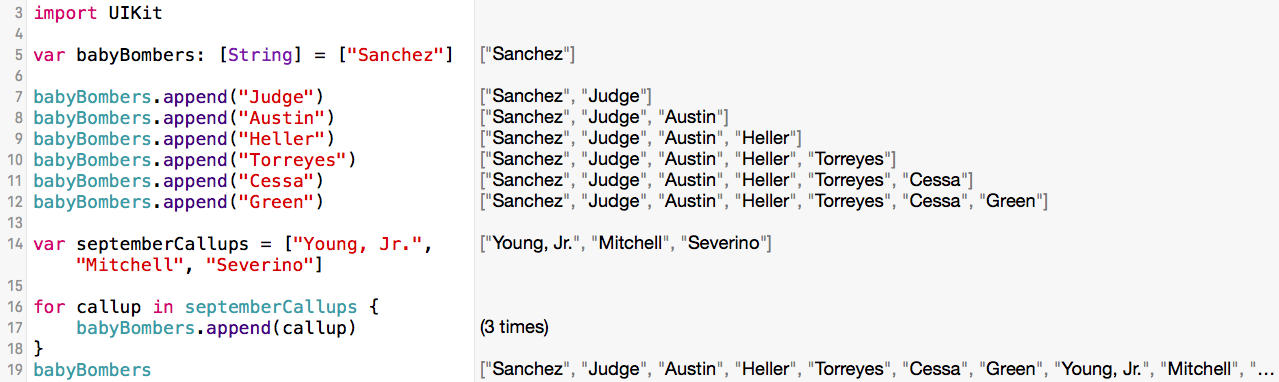
What if we want to add an array of Yankee September call-ups to our babyBomber array? Let's take a look at that.


How'd we do that? First, we created a new array, septemberCallups, and filled it with strings such as, "Young, Jr.", "Mitchell", and "Severino". Then we set that array to the variable septemberCallups. Next we setup a for loop that goes through the septemberCallups array for each string value, or in our case, each of the three callups, and then appends it to the end of the babyBomber array which we can on the right of line 19.

We've appended new array items to the end of the array, but what if we want to insert a new item to the array in a specific place? Let's try that by inserting "Severino" after "Judge".


Before we complete this, take a look above at what Xcode offers us after we type ".insert". Xcode asks us for two things: to enter our new element which is a string ("Severino") and an integer to identify where in the array it should go. Now let's finish inserting Severino.


And there's Luis Severino on the right hand side of line 14 right after Aaron Judge and before Tyler Austin.

Now let's say you're working with a friend on a project and the goal of that project is to create a master array of everyone who has ever played for the Yankees. Your friend has amassed a big list that she's put into an array and so have you. Now you want to see if the two lists are the same. If they are, there's a chance you've got everyone. If not, you'll have to iron out who is missing whom. How do we check to see if the two arrays are equal? Let's take a look.


For the sake of time, we'll assume small lists of Yankees, one for Bob's list of Bombers and one for Jill's list of Bombers. A quick eye-test concludes that they both have all the same players, but Xcode tells us that the two arrays are not equal. Why?

Remember how arrays are ordered lists, in other words, that their orders matter? Well, Bob and Jill may have the same players, but they are listed in different orders so according to Xcode they are not equal. Bob and Jill will have to try another collection type to solve their problem.

Challenge: Re-write these examples with your team's rookies and Tweet them to me (@randallmardus).

On Deck: The dictionary collection type.