Showing posts with label how to code. Show all posts

Friday, July 15, 2016

Marte on first, Harrison on third, less than two outs, what do you do?

Starling Marte is on first and Josh Harrison leads off of third, less than two outs. Marte takes off for second. As the catcher, what do you do? Do you throw it down to second to try and get Marte, risking Harrison scoring? Do you just throw it back to the pitcher? Or do you call a special play where the shortstop cuts off the throw to second just behind the mound to get the runner at home?


A lot going on, right?

The conditionals we've played with so far couldn't handle this much. They could handle, "if Marte goes then throw to second, else throw to pitcher", but they can't handle, "if Marte goes and the pitcher throws a fastball, then throw to second, else throw back to the pitcher."

Fortunately, there are logical operators. What are logical operators, you ask? Good question. Let's take a look at Apple's documentation:


Now let's put these logical operators to work in our Marte and Harrison example above:


We have a few options here. If it is true that the runner on first goes AND (&&) it is true that the pitcher throws a fastball then the catcher can throw down to second (better chance than if the pitcher throws a slower pitch, but still a tough play); else, it is false that the runner on first goes in which case there is no need to throw to second.

In the second conditional, if it is true that the runner on first goes AND (&&) if it is true that the pitcher does NOT (!) throw a fastball, then the catcher can eat it as there's not a good chance he'll get the runner at second; else, if it is false that the runner is going to second, then there is no play at second and no need to throw it there.

In the third conditional, if it is true that the runner on first goes OR (||) it is true that the runner on third is fast, then the catcher should call a play for the shortstop to cut off the throw to second behind the pitcher's mound to try and get the runner from third at home; else, if it is false that the runner from first is going to steal second, there there is no play at second and no need to throw there.

As you may have noticed, when Marte did not go for second I skipped over whether or not Harrison would take off from third. Why? Because in baseball terms didn't matter. More importantly, the computer thinks the same way. That is, if the first condition is not true, then the program we've written breaks and stops running. The programs stops running as soon as something is false so in this case, it doesn't even get to Harrison.

Unfortunately, there's a problem with this code. Can you see it? The problem is that the catcher is told to do three different things when we need to do one. Why is that? That's because each "if" statement - or function - is considered unique and not related to the others. In the next post we'll re-write the code as one function which will solve this problem.

Challenge: Marte on first, Harrison on third, less than two outs. You're the centerfielder. Depending on where the ball is hit, how hard it is hit, and what the runners do, what are your options? Code it out, take a screen shot and tweet it to me (@randallmardus).

On Deck: Nested ifs!

Wednesday, June 22, 2016

Clayton Kershaw, Floats, and the Incredible Shrinking WHIP

In our last post, we talked about the Swift integer or Int data type and ended up with a glaring problem: We couldn't use Int data types to figure out Cy Young's WHIP. Namely, because the result isn't an integer or whole number, it's a decimal.

Unfortunately, Swift doesn't have a decimal data type. Instead, it has Float and Double data types. Today we'll go over Floats and we'll give calculating WHIP another shot this time using Clayton Kershaw as our example.


What is a Float?
A Float is a data type like string and Int that accounts for decimals and fractions up to 14 places past the decimal point.

Why are Floats important?
As we saw when trying to calculate Cy Young's WHIP, Floats are important because they help us work with numbers that aren't integers or whole numbers, but rather numbers that are fractions or decimals.

When do we use Floats?
We typically assign Float data types to variables and constants we know will require short decimals. In baseball, this includes batting average, on-base percentage, slugging percentage, OPS, WHIP, ERA, innings pitched, and fielding percentage to name the biggies. Here are some examples:


Baseball stats rarely pass the decimal point by more than four places as seen above. This is perfect for Floats which are best for decimals of up to 14 places.

Another good reason to use Floats is to account for uncertain numerical outcomes. Classic cases of uncertain numerical outcomes occur when the output of a function is unknown going into the problem. For example, let's say Kershaw pitched a complete game (nine innings) giving up eight hits and one walk. This gives us a WHIP of 1 (8+1/9 = 1). We could have used the Int data type here because we had all whole numbers (9 innings, 8 hits, 1 walk, 1 WHIP).

But what are the chances over the course of an entire season or career that Kershaw's WHIP will always be an integer? He may throw a couple no-hitters (0 WHIP), have a bunch of solid one WHIP games, and maybe some bad 2 WHIP games, but chances are his WHIP will be a Float. Because this is a highly likely outcome it makes sense to assign the Float data type to associated variables and constants early on so they can account for these uncertainties later on.

So let's try calculating Kershaw's career WHIP (as of 6/19/16) using Floats:


Maybe you're thinking, wait, hits allowed and walks allowed will always be Ints! In the same way that strings and Ints don't play well together, neither do Ints and Floats.

There is a way to keep hits and walks allowed as Ints called type casting. We'll get to it down the road.

On Deck: Doubles


Wednesday, June 15, 2016

Cy Young, a Man of Many Integers

In the last post, we talked about how there are different types of ballplayers (power hitters, contact hitters, power pitchers, junkballers, etc) and how there are different types of Swift data types, specifically the string (anything between quotation marks), and how both types are good at certain things and not even considered for other things.

Today, we'll go over another Swift data type, the Integer or Int.

What is an Int?
If a string is anything between two quotation marks, then an integer is any whole number (e.g., 2, 3, 19, 1002, -49275020457). In baseball terms, integers appear as wins, losses, home runs, hits, stolen bases, and saves to name a few instances.

Why are Ints important?
Declaring a variable (var ichiroUsHitTotal = 2974) or a constant (let ruth = 3) to have an integer data type gives the rest of your function or code a clear heads up that that variable or constant is an integer and as an integer can do certain things and cannot do other things.


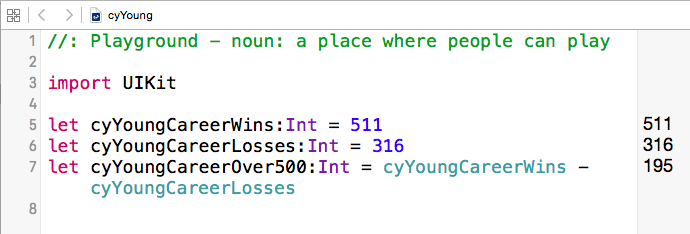
For example, let cyYoungCareerWins = 511. In this case, Cy Young's career win total is 511 and because he's retired (and, well, deceased) that is a constant which means his career win total will never change. Because we know his career win total is an integer (511) we can now subtract from it another integer (316, his career loss total) to figure out how many games over. 500 he was for his career.


What can integers not do? As we learned in the post on strings, we cannot add strings and integers together. They're like oil and water, Earl Weaver and umpires, or Jon Lester and throwing over to first base.

When do we use Ints?
We use Ints when calculating things, either through addition, subtraction, multiplication, or division. The thing about integers is, we need to know in advance that the final answer will also be an Integer. Why? Good question. Say you wanted to calculate Cy Young's lifetime winning percentage:


Dude won 511 games. His lifetime winning percentage can't be 0! Of course not. It's 0.61789600967352. Unfortunately, 0.61789600967352 is not an integer. In terms of Swift, it's a Float and in this particular case because it is less than one, it is zero.

Here's another example to keep an eye out for. While Young had six seasons with a WHIP less than 1.000, let's take a look at his 1892 campaign with the Cleveland Indians when he had a WHIP of 1.062. Here it goes:


Again, because we're dealing with declared integers and the answer isn't an integer the computer doesn't budge. Instead, it comes out with the closest Integer, in this case one. On top of that, the computer rounds down. Even if Cy had walked 500 batters that year for an eye-watering 1.905 WHIP, the computer would tell you he had a WHIP of 1.000.

So what do we need to do to properly calculate things like WHIP, ERA, or OBP? We need Floats.

On deck: Calculating Clayton Kershaw's career WHIP with Floats.


Wednesday, June 8, 2016

What Makes "Ripken", "4,256", and ".406" strings?

In earlier posts we assigned "Ripken" to the constant battingThird and assigned "3B" to the variable oquendo. Why did we put Ripken and 3B in quotations? By putting them in quotations we turned them into strings. But what are strings?

In baseball, there are different types of players. There are contact hitters, power hitters, base stealers, power pitchers, junkballers, pinch hitters, and the guy on the bench who gives rookies hotfeet.

Contact hitters will hit at the top or bottom of the order. Power hitters will hit in the middle of the order. People who are not base stealers are not going to steal bases. Pinch hitters aren't going to play everyday and the guy on the bench isn't on the bench because he gives good hotfeet.

In other words, each of these types of players have specific roles.

Similarly, Swift has different data types that play specific roles. Today, we'll go over the string data type. In short, anything between two quotation marks is a string. Here are some examples:

"Ripken"
"The Giants win the pennant!"
"4256"
".406"
"%"

They are all strings because they are all surrounded by quotation marks. As you can see, a word can be a string. A sentence can be a string. A whole number or integer can be a string. A decimal or float can be a string. And a symbol can be a string. As long as whatever is written is between quotation marks, it is a string.

Sometimes you'll even see something like this:

var musialBattingAverage = ""

This is an example of an empty string. Why would someone write an empty string? Maybe there is a baseball app that requires the user to pick a player and a year before returning the player's batting average for that year. If, for instance, the user chooses Stan Musial and 1943, the value of "" will then change to ".357", Musial's batting average that year. If the user chooses Musial and his last year, 1963, it will change to ".255". musialBattingAverage is, after all, a variable and can change.

Why are strings important?
Strings help users of apps input information, edit information, and update information. If you are on baseball-reference.com, and you want to look up the career stats for Yogi Berra you can type in Yogi Berra in the search bar and baseball-reference.com will return Yogi's career stats for you. Here is how baseball-reference how they process these search queries:


In other words, if you tried to search using other data types such as integers (e.g., 20 (most strikeouts in a game), 287 (Hughie Jennings' record for most career HBPs), 1,406 (Rickey Henderson's record for stolen bases)), floats (.406 (Ted Williams' batting average in 1941), .215 (Mario Mendoza's lifetime batting average, believe it or not), 1.3791 (Babe Ruth's highest single season OPS)) or Booleans (values that are either true or false, e.g., Did Trevor Hoffman play for the Padres? True. Did Don Mattingly manage the Yankees? False.) the baseball-reference.com search engine would show you this:


What can you do with strings?
Good question! You can concatenate or add strings together like this:


When do you use strings?
I Googled "When do you use strings?" and I got nothing but advice on guitars. My ad hoc answer is we use strings to print out words and other values to the screen for users to view.

What can you not do with strings?
In the same way that a manager should not bat Mario Mendoza cleanup or ask 2012 Jamie Moyer to throw 98 MPH heat, there are things Swift strings cannot do.

As we saw above, you can add strings to other strings ("Derek" + "Jeter" = "Derek Jeter"), but you cannot add strings to other data types such as integers (the number 10), floats (.406), or Booleans (values that return either true or false and nothing else). If you try to add a string to another data type in Swift you'll get this error:


Rather, you'll need to cast or convert the 10 integer into a string. Here's what that looks like:


If you want clean this up a bit, you can add space between Rizzuto and 10 by doing this:


That's a lot of code for today so let's end with this:


On Deck: Cy Young, a Man of Many Integers


Wednesday, June 1, 2016

Jose Oquendo & Variables

In the history of major league baseball, only four men have played all nine positions in one game. This does not, of course, include Will Ferrell's even more impressive feat of playing for ten different teams in one day. But when I think of utility players the first that comes to mind is Jose Oquendo.


Oquendo played twelve seasons, the first two with the Mets, and the rest with the Cardinals from 1983-1995. In 1988, Whitey Herzog penciled Jose to play second in 69 games, third in 47, short in 17, first in 16, right in 9, center in four, two in left, to catch one and to pitch one.

If Cal Ripken was a constant in the Orioles' batting order, Oquendo's defensive positions were always variable. Here's what Oquendo's defensive assignments for May of 1988 looked like:

How do we represent all of Oquendo's different positions in Swift? Here's how:


Unlike when we tried to move "ripken" out of batting third, there are no errors when changing Oquendo's variables.

I like to imagine that Oquendo had several different gloves and when called upon to play a different position he grabbed the appropriate glove. The same applies when working with variables which are declared once with the keyword "var" and then re-assigned new value after the assignment operator (=). 

When Whitey assigned first base to "oquendo", Oquendo grabbed a first baseman's glove. When assigned to shortstop, Oquendo grabbed an infielder's glove. When Herzog assigned a different position to Oquendo, Oquendo dropped the old glove (in this case, the position value) and picked up the new one. 

The same happens with the values of a variable. In this case, the variable "oquendo" has values such as "2B", "SS", "3B", "CF", and "1B". Variables do not hold onto their values the way the constant "ripken" held onto the third spot in the batting order. Rather, a variable grabs its new value and goes with it until a new value, or in Oquendo's case a new position is assigned to him, and it needs to grab a different value (and Oquendo needs to grab a different glove).

Variables are important because they help the Whitey Herzogs of the world use the Jose Oquendos as circumstances change. Ozzie Smith needs a day off from shortstop? We'll put in Jose. Willie McGee's not feeling well. We can stick Jose in centerfield. Things change. Variables allow for their values to change.

When do we use variables? We use variables when we think the value of something will change. Think of Joey Votto's batting average, Jose Iglesias' fielding percentage, Clayton Kershaw's ERA, Jake Arrieta's WHIP, or Ichiro's hit total. They are going to change over the course of a season. They are variables.

On Deck: What Makes "ripken", "4,256", and ".406" Strings?

Wednesday, May 25, 2016

Cal Ripken, Jr. & Constants

When baseball fans think of Cal Ripken, Jr. they think of consistency: A man whose name we saw in the lineup for 2,632 straight games, a record streak that spanned 16 seasons. Ripken was a constant in the lineup because his presence there did not change.


And that is what a constant in Swift is: Something that does not change. Constants are established by the keyword "let". Here's an example in an Xcode Playground:


If we even tried to change a constant, we'd throw an error. Go ahead, try to run this below the "let battingThird = "Ripken"" line:

let battingThird = "Murray"


No dice. As his manager assigned Ripken to bat third everyday, so we assigned Ripken to the constant "battingThird".

It is important to note that we do not equate Ripken with battingThird. The equals sign here is not the equals sign we are used to from elementary school math problems. More accurately, we are assigning the value to the right of the assignment operator (the = sign) to the constant on the left of the assignment operator (=). We are assigning Ripken to battingThird just the way a manager assigns a player to a position or a spot in the order.

So, as you can imagine, it's better to read statements that include = from right to left. If "let battingThird = Ripken" walked to the plate, old Yankee public address announcer Bob Sheppard would announce it as, "Now batting, Ripken is assigned to the constant battingThird. battingThird." This is about as intuitive as "When you come to the fork in the road, take it," but there it is.

Why are constants important?
Constants are important because they nail down a value and keep it consistent. Once you know Ripken is batting third, you don't have to think about who is batting third anymore and you can depend on that constant to not change. You can also concentrate on the rest of the lineup which is full of question marks, or, variables.


When do we use constants?
Developers use constants for parts of their code they do not expect to change ever. Examples of this include someone's date of birth, Social Security Number, eye color, and Mariano Rivera's run in from the bullpen music.

On Deck: Jose Oquendo and Variables.


Friday, May 6, 2016

Mandarin to Portuguese to Pepper

At the end of my first coding bootcamp a classmate remarked that coding went from feeling like learning Mandarin to learning Portuguese with the hopes of it one day making it to English.

I've described coding as akin to assembling Ikea furniture in the dark with Japanese instructions.

Long story short, it's hard. Why is it hard? How many reasons do you want?

At the end of the day, for me, it comes back to a combination of having no mental picture in my mind to revert to. The first time you travel to a new place it seems to take a long time and you aren't quite sure when you'll get there. The next time you make the trip you see markers along the way that remind you of your progress and you get a better feel for where you are in the journey. There may even be some muscle memory built up from the turns you've made.

In the beginning, coding is like that first road trip. My goal with The Wheelhouse is to align the unfamiliar (coding) with the familiar (baseball) so that it can sink in a little faster and so I can have a richer set of images to associate with coding's abstract ideas. Think of this like the memory of loci, but instead of homes we're using baseball to strengthen our coding memories and abilities.

I'll get into the basics (what is a variable? what is a constant?) and gradually dig a little deeper into Swift and iOS programming minutiae. We'll also get into more general stuff that I've found helpful along the way. Each post will address the following in bite-sized portions:

1) What are we addressing?
2) Why is it important?
3) When do you use it?
4) How does it work?
5) Provide an example of it for readers to see what it looks like (in code and live)

I don't like to make promises, but here is one that I will do my best to observe: I will refuse to use the words easy, simple, basic or obvious when describing any of the concepts or steps ahead. It drives me nuts when tech writers use these words as they make an assumption that may be false while, at the same time, potentially insulting and frustrating to their readers. I still remember what it's like to be that reader which is why I'm writing The Wheelhouse. If I do use the words easy, simple, basic, or obvious in non-sarcastic ways, you have my permission to remind me of the promise I made.

Deal?

Good.